Author Archives: Andy

Remembrance Day 2010 Logos

At the 11th hour of the 11th day of the 11th month of the year 1918, The Great War came to an end. Two years later, a two minute long pause of silence was suggested as a mark of Remembrance to the 16,543,185 dead and 21,228,813 casualties. Last year I reported showed the Google and Bing Remembrance Day logos, and thought it was a good idea to carry on the tradition.

Bing have done a full page takeover again:

Whereas I find Google’s attempt less eyecatching that in previous years, with a solitary Poppy underneath the search buttons, and is only available on Google.co.uk:

We also covered newspaper logos showing their signs of respect last year, or at least Malcolm did. The MailOnline was getting a bit of bad press, but they seem to have changed their ways this time around:

The other mainstreams I checked all did something similar… except, as you can see, the Guardian, who are this year’s black sheep of the bunch:




Conferences, Portable WiFi Hotspot, Firesheep and Black Hat SEO

Want to know how you could use Firesheep to help your SEO efforts? Read on, but please take this caveat: The following is a purely hypothetical situation and should not be put into practice as it could – and probably would – land you in theĀ proverbialĀ if you got caught. Also, I know this has the potential to draw some flames from people stating that this “is already do-able through other means”… but I’m merely highlighting a newer, easier way. Continue reading

Chrome 7 – Auto Preview In Window

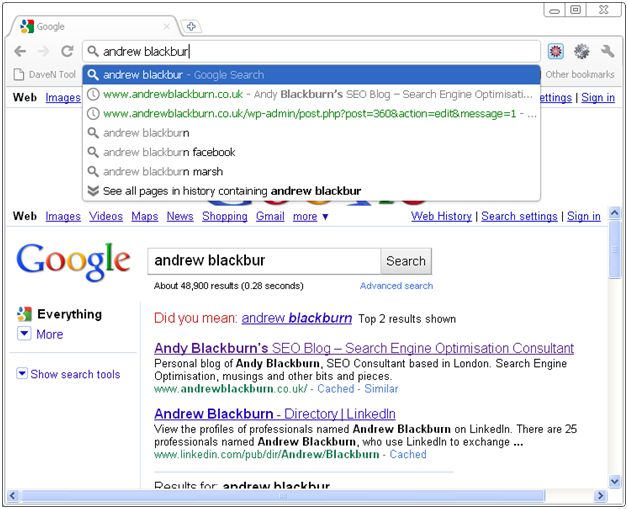
I don’t recall seeing this before, but I stumbled across this quite by chance this morning after upgrading to Chrome 7 yesterday. It seems Chrome is now showing auto previews of sites and searches in the main window, as you type them into the address/search bar.

Starting at Google.com, I began typing in the address of my blog into the search bar. Note, this is without hitting return/enter:

Chrome auto-previews site

The same happens when searching for a term, and note, the search results autoupdate as you type:

Chrome autopreviews searches

Inappropriate Ads on Sky News

Inappropriate adverts on Sky News

Click for bigness

I’m no prude, but I thought the advert on this piece of news was a little inappropriate. I regularly check the news from client offices, and although it’s innocent enough, could be glanced at from a distance and be very misleading as to the content I was viewing.

Thoughts in the comments, email or snail mail.

Google Instant – UnBlacklist

Google Instant was rolled out earlier this month, allowing users to see the search results for words as they are typing them. I won’t bore with the details, as if you haven’t seen it already, there are plenty of blog posts out there showing it off in great detail! There has also been a rush of talk about the dreaded “blacklist” that Google has applied to Instant, and how seemingly reasonable searches will not show up unless you complete the search word and click “Search” or hit Enter.

In light of the “naughty” filter (as it’s being referred to), 2600 (the hacker group) have begun compiling a list of words that have been blacklisted by Google Instant, fairly or not. At the end of said blacklist, is a list of words which are not blacklisted, even though they would do well to be, given the guidelines Google seems to be following at the moment. You can, for example, search unhindered for the phrase “how to commit suicide” without the big G sticking its beak in.

Hungry to know more, I quickly thought of a word, to see which list it would fit in… out of curiosity. Imagine my surprise, when searching for “clung” – as in: “the climber clung to the cliff-face for dear life after his safety line snapped leaving him dangling above a great big gorge” – I was given the following suggestion from Google, as well as a full Instant result:
Google Instant Search - Clung

Note the lightly shaded letter “e” urging me to complete the search.

I also found the third result for the full, dirty, uncensored search reasonably amusing!
Google Instant Search - Clunge

But you can’t search for “teen”!